

How To Create A Second Whatsapp Account
Last updated: 21 Jun 2021

WhatsApp is a platform with over 1.5 billion users, but being the most used messenger app, it does not offer to add another account. Almost every brand releases dual SIM phones, and it can be hard for users to manage two WhatsApp accounts. Until we don't have a built-in way, we have other options. The blog post covers 3 ways t0 dual WhatsApp on any popular Android device.
- Dual WhatsApp (Xiaomi, Oppo, Vivo, Asus / Huawei)
- Dual WhatsApp (Nokia, HTC, LG / Motorolla)
- Samsung
- Dual Messenger
- Secure Folder
- Activate Samsung Secure Folder
- Summary
Dual WhatsApp (Xiaomi, Oppo, Vivo, Asus / Huawei)
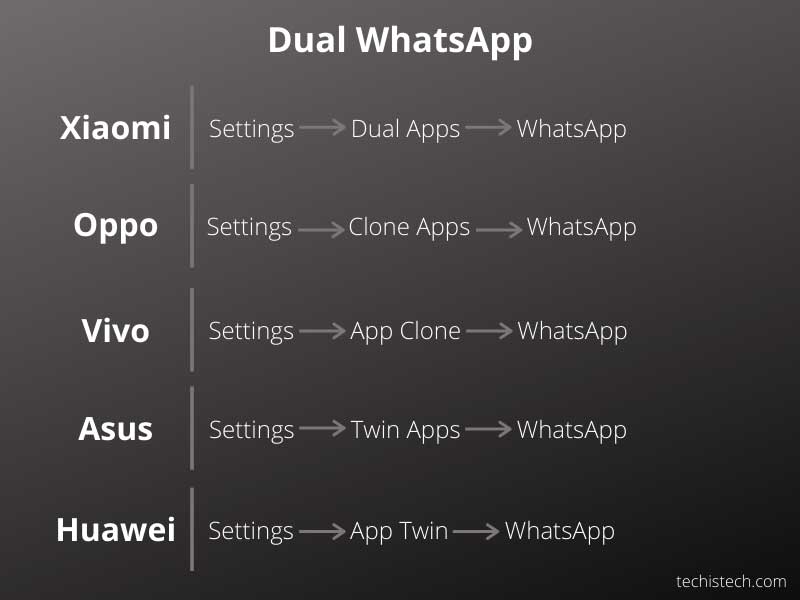
All the mentioned brands have built-in features. Follow the text to find your brand and learn how to activate the second WhatsApp on one of the above.
Xiaomi: Settings -> Dual Apps and tap on it -> WhatsApp
Oppo: Settings -> Clone Apps
Vivo: Settings -> App clone
Asus: Settings -> Twin Apps
Huawei: Settings -> App Twin
Dual WhatsApp (Nokia, HTC, LG / Motorolla)
Those brands do not support the feature of using the dual WhatsApp. But, we can use a third-party app. Dual Space is an app cloner. Parallel Space is another one, but Parallel Space doesn't support Android 10 and 11. You might also need 64-Bit support of Dual Space, depending on your device.
Open the app and add apps by tapping on the add button. Find WhatsApp in the apps menu and import it. Once imported, you are free to use the second WhatsApp on your phone. Make sure to allow permissions to get the notifications.
Related: Samsung Health vs. Apple Health (2021)
Samsung
Dual Messenger
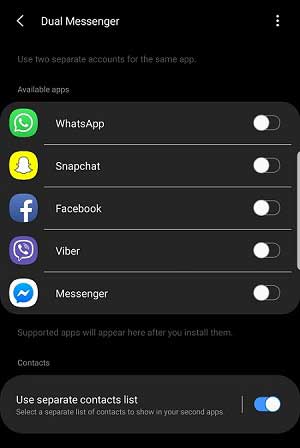
Samsung devices come with a feature called Dual Messenger. Although the name represents Messenger, you can use most of the messaging services.
What is Dual Messenger? According to the Samsung website, Dual Messenger is a tool that offers to use a second internet messaging service. Follow the below steps to enable the dual WhatsApp account:
- Settings -> Advanced Features -> Dual Messenger -> WhatsApp. Once done, the second WhatsApp app will be available in the apps menu.
The feature is limited to certain models. If you can't find the option, your device might not be compatible with Dual Messenger.
Secure Folder

Secure Folder, previously called Samsung Knox, allows you to use a different Android OS on your Samsung device. The primary reason for this tool is separating home and work tasks. It is available on most Galaxy devices, including and after Galaxy S6.
Related: Facebook vs. Facebook Lite
Activate Samsung Secure Folder
By default, it comes enabled, but if you can't find it for any reason, then enable it in the settings.
- Set up the Samsung account.
- Settings -> Lock screen & security -> Secure Folder. Login with your account when enabling it.
- The shortcut is also available in the notification panel.
Summary
WhatsApp has been downloaded over 5 billion times, but the company has not released an official way to use dual WhatsApp. The article covered the easiest ways. Please let me know your views in the comments so we can discuss more.
How To Create A Second Whatsapp Account
Source: https://www.mksguide.com/dual-whatsapp-account-same-device/
Posted by: patrickkilve1982.blogspot.com
0 Response to "How To Create A Second Whatsapp Account"
Post a Comment